Note: Older entries on this page still mention GRIID, the GRIID skill or CONNECT Ai. These functions are now part of neoom Ai. You can enter electricity prices and electricity contracts in the neoom app under Account settings → Electricity contracts (since app version 2.14.0).
#### 🆕The neoom WhatsApp channel for Power PartnersThrough the channel, we keep you informed about things like:* relevant news about neoom Connect Ai and BEAAM* product and firmware updates* important technical changes and system messages* planned maintenance or known limitationsThe WhatsApp channel complements existing communication channels and is meant to help when information needs to reach you promptly, even when you are on site with a customer. Of course, you can still find the information on this page.Using the WhatsApp channel is voluntary. To join the channel, please click the link below, read the privacy information and then click: JOIN
🎉NEW FEATURES AND SYSTEM UPDATES🎉
⏰ Time-window tariffs can now be configured in the neoom app (Germany and Austria) [16.11.2026]
From now on, your customers in Germany and Austria can enter a price with fixed time windows in the neoom app. This makes it possible to represent electricity tariffs whose energy price depends on the time of day and the month, for example summer tariffs, night tariffs or low-cost midday windows.

How it works:
- neoom app - Account settings - Electricity contract
- Under Electricity purchase contract, select the option “Price with fixed time windows”.
- Enter a standard energy price (ct/kWh, excl. VAT). It applies whenever no time window is active.
- Use “+ Add time window” to create any number of time windows, each with:
- its own energy price (ct/kWh, excl. VAT)
- time active from / to
- validity for weekdays and/or weekends
- selection of the months in which the time window applies
Example: Standard price 14.15 ct/kWh, plus an energy price of 5.5 ct/kWh from 10:00 to 16:00 from April to September and 11 ct/kWh from October to March.
What is the benefit? This means neoom Ai knows the tariff's actual price windows and can deliberately shift storage, wallbox and heat pump operation to the low-cost periods. This increases the savings for your customers.

💡 Tip: neoom Ai optimizes most precisely when all electricity price components have been entered. It is best to use the values from the tariff sheet of the current electricity contract or from the latest bill. If you do not enter your own values, neoom Ai uses preset average values based on regional costs and charges.
🚗New charging stations: PCE EV 11.3 and Wallbox Pulsar Pro, Max and Plus can now be controlled by neoom Ai [06.11.2026]
neoom Ai now supports the modes
- INTELLIGENT CHARGING
- SURPLUS CHARGING
- FAST CHARGING
for the PCE EV 11.3 and Wallbox Pulsar Pro, Max and Plus charging stations

Details about the supported functions and parameters that neoom Ai can read from the charging stations can be found here: PCE EV 11.3: https://neoom.com/neoom-ai-geraete?deviceId=a396c1b1-16ba-4faf-8e04-eb2049c98240 Wallbox WBC Pulsar: https://neoom.com/neoom-ai-geraete?deviceId=68dcae1a-ba27-46f5-95ab-f359ed1db11b&versionId=410b82fe-adab-4a17-9247-050c6d91e452
🎉 neoom Ai added to the BAFA list of eligible energy management software
Good news for our neoom Power Partners in Germany: neoom Ai has been added to the BAFA list of eligible energy management software. This means neoom Ai can be considered for suitable commercial investment projects under the Federal Funding for Energy and Resource Efficiency in the Economy (EEW), Module 3 “Energy management systems”. For you, this is an additional opportunity to use neoom Ai with commercial customers whose projects meet the funding requirements. Important: Being included in the list does not by itself create an entitlement to funding. Whether the software and the planned investments are eligible in a specific case depends on the applicable funding conditions. As a rule, funding must be applied for before the measure begins. You can find more information on the BAFA website on eligible energy management software.
📣ANNOUNCEMENT FOR Q1/2027: Integration of Bosch / heat pumps
Due to multiple requests, we would like to let you know that the EEBUS connection for controlling Bosch / Buderus heat pumps is planned for Q1/2027.
💪NEW KLUUB DASHBOARD 🎉
The new KLUUB dashboard is here
With the new KLUUB dashboard in the neoom app, energy communities and their members keep an even better overview of their energy. The most important new features:
Energy data without waiting: Energy data is displayed as soon as it is available. As a rule, the previous day's data is already available by 4 pm.
Hourly resolution: KLUUB energy data is now displayed hourly.
Average daily profile: The monthly view shows how the energy community behaves on average over the course of a day.
Data quality at a glance: A notice shows whether the KLUUB data is already complete.
Added value of neoom systems made visible: neoom KLUUB and neoom Ai customers with night feed-in activated can see more clearly what added value their neoom system brings.
Electricity availability in the community: Members can see when and how much electricity is available in the community.
In addition, there are numerous other improvements


🚗Mennekes Amtron 4You, 4Business and PCE PRI:Charger can now be controlled by neoom Ai [28.08.2026]
neoom Ai now supports the modes
- INTELLIGENT CHARGING
- SURPLUS CHARGING
- FAST CHARGING
for the Mennekes Amtron 4You and 4Business charging stations as well as the PCE PRI:Charger.
🌎neoom app now also available in English, French and Dutch [28.08.2026]
The neoom app can now also be used in English, French and Dutch. You can change the language in the profile settings:

🚗Integration of Tesla Wall Connector 3 [28.08.2026]
The Tesla Wall Connector 3 can now be read by the neoom system, and the status as well as the charging power and energy amounts can be displayed in the neoom app. Active control of the modes Intelligent charging, Surplus charging and Fast charging by an external system such as neoom is not possible with the Tesla Wall Connector 3, because Tesla does not provide the interface for it.
🆒More efficiency when creating the CONNECT site with “Device Scanning” [03.07.2026]
Adding devices to neoom CONNECT is now even easier and faster! With the new Device Scanning function, you can scan the customer network directly via the BEAAM energy manager.
Your benefits at a glance:
- Faster commissioning: No more tedious searching for IP addresses.
- Automatic detection: The BEAAM scans the local network and lists compatible devices clearly.
- Easy assignment: Simply select the desired device from the list and add it directly to neoom CONNECT.
How to use the new function:
- Go to connect.neoom.com and select the site.
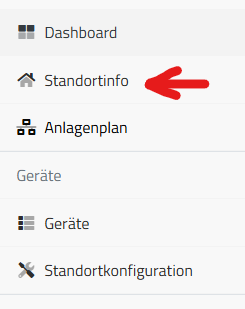
- Click “Site configuration” in the navigation bar
- Click “Scan network”

- After a few seconds, all devices that the BEAAM finds in the customer LAN appear there.
- Click “Configure” on the device found and set it up in neoom CONNECT as usual. However, you no longer need to enter the device's IP address during setup, as it is already known from the “Device Scan” and prefilled.
Note: The BEAAM searches for devices using the network protocols mDNS and SSDP. Which information a device provides via these protocols depends on the manufacturer. You can find the information provided by the device in the tile of the device found when you click “Details”. This can help if the device cannot be clearly identified from the information shown in the tile overview.
In addition, the BEAAM also uses an IP address scan to find devices in the local network if the device supports neither mDNS nor SSDP for device discovery. (However, most energy devices support at least one of the two protocols.) In this case, the BEAAM only shows the IP and MAC address of the device found. The IP address scan is only supported in so-called /24 IP networks (subnet mask 255.255.255.0). Otherwise, the list of IP addresses found would be too long.
✉️New in the neoom app: The notification center [03.07.2026]
We have rolled out a new feature in the neoom app that makes communication with customers even easier: the notification center!
From now on, neoom app users (whether energy management or KLUUB customers) will find important information that we send them collected in one central place directly in their app.
Important updates (and in the future also system information) arrive as push notifications directly on the customer's smartphone and then remain stored in the notification center.
How to get to the notification center in the app:
Click the profile icon:

and then “Notifications”:

The notification center is active as of neoom app V2.16.8.
🌡️Integration of new heat pump models in neoom Ai (formerly neoom CONNECT) [11.06.2026]
The following heat pump models can now be integrated into neoom Ai:
- Daikin Altherma 3 (via Daikin Home Hub)
- Daikin Altherma 4
- Ochsner air-source heat pumps of the AIR series
- Stiebel Eltron WPM models 3, 3i and 4
The connection is made via Modbus TCP, so no BEAAM Extension is required for control. You can find out more about which data points of the heat pumps neoom Ai can read here: Heat pump compatibility list
🌡️Integration of Ochsner air-source heat pumps in neoom Ai (formerly neoom CONNECT) [11.06.2026]
Ochsner air-source heat pumps of the AIR series can now also be integrated into and controlled by neoom Ai. The connection is made via Modbus TCP, so no BEAAM Extension is required for control. You can find out more about which data points of the heat pump neoom Ai can read here. https://neoom.com/neoom-ai-geraete?deviceId=81dfb3b3-75a8-4962-82e7-552482d52cba
📢 Note on the topic “Multiple storage systems at one grid connection point” [27.05.2026]
Due to frequent questions and many incorrect installations, we would like to inform you in the following article about which multi-storage-system configurations behind one grid connection point are supported and which are not:
🌞Intelligent shifting of PV surplus feed-in [26.05.2026]
Starting 26.05.2026, neoom Ai will deliberately shift PV surplus feed-in to times when there is no feed-in peak load in the grid or in the energy community.
The benefit:
- This allows feed-in producers in the energy community to preferably feed in energy when there is actually demand within the community, and not at times when there is already a surplus anyway. This leads to higher EC feed-in revenue.
The function, available for some time already, for feeding surplus energy from the storage into the energy community is not affected and continues to work as usual.
- In addition, this function also benefits the grid, as it helps reduce overload situations during times of high PV feed-in. - You're welcome, dear grid operators 😉
🔆Display of the PV forecast in the neoom app 🔆 [26.05.2026]
Starting with neoom app version 2.16.3 (available around 26.05.2026), the energy management overview shows the PV production forecast for the current day and for tomorrow.
To see it, click the production tile:

The forecast then appears below it:

The forecast is calculated by neoom Ai and is based on historical PV production data as well as the weather forecast. Please note that for a new site, the forecast is not yet accurate during the first 2 weeks, as the system first has to learn.
Feed-in curtailment at negative feed-in prices [07.05.2026]
With BEAAM SW version 1.76, officially released on 06.05.2026, the function “Feed-in stop at negative feed-in prices” is officially available for all sites. If SW version 1.76 is not yet installed at the site, an update can be triggered at connect.neoom.com --> “Site configuration” --> “Apply configuration”.
With this version, during times of negative feed-in remuneration, neoom Ai will try to charge the generated PV electricity into the battery or to activate other consumers (heat pump start recommendation or charging the car with PV surplus). If this is not possible, PV production is curtailed to the point where the site's own demand is covered but no grid feed-in takes place. PV curtailment works with the following inverters: https://neoom.com/neoom-connect-geraete?sector=private&features=feed_in_limitation
More information:
Electricity tariff entry for a site is now also possible for Power Partners [28.04.2026]
We received feedback that some of you would like to offer the electricity tariff entry in the neoom app (see app release of 30.03.2026) as a service for customers. This was not possible until now, as only the site owner could enter the tariff. This has been changed at your request, and from now on you can also perform the entry for your customers in the CONNECT user role “System partner”.
📣The INSTALLER has moved [15.04.2026]
With neoom app version 2.15, the Installer is no longer accessible via the app, but via connect.neoom.com.
To create a new site, go to connect.neoom.com and click “Sites” in the top menu.
You will then land on a new site overview that shows you the individual Installer steps of the sites already created and through which you can also create new sites with the classic INSTALLER steps.

Why this change is being made:
- The INSTALLER functions were previously split between the neoom app and connect.neoom.com. This often led to stability problems. With the unification, the INSTALLER functions will be more stable in the future.
- With this change, we are creating the basis for bringing further useful extensions to the INSTALLER in the coming months, which will allow you to create and configure sites faster and more easily.
We recommend using the INSTALLER on a device with a large screen (laptop or tablet), as using it on a smartphone is technically possible but harder to operate.
🆕 New neoom CONNECT Ai functions - Big update in the neoom app [30.03.2026]
The app release V2.14.0 (available from the end of March 2026) brings some important new features:
1. Support for time-variable grid fees
1.a. For Austria: Support for the so-called SNAP (Sommer-Nieder-Arbeitspreis, summer low energy price)
From 1 April, the so-called “Sommer-Nieder-Arbeitspreis” (SNAP) applies to grid fees in Austria. This is a 20% reduction in grid fees from the beginning of April to the end of September between 10:00 and 16:00. You can find details here: https://www.e-control.at/sommer-nieder-arbeitspreis
From app version V2.14.0, the predictive intelligence of CONNECT Ai also takes this time-based grid fee reduction into account. This lets customers save even more with intelligent battery or e-car charging.
Important: For customers to benefit from SNAP, they must make sure their smart meter measures consumption data in quarter-hour intervals. This can be set in the grid operator's smart meter portal.
1.b. For Germany: Support for time-variable grid fees according to §14a EnWG - Module 3
From app version V2.14.0, the predictive intelligence of CONNECT Ai also takes time-variable grid fees according to §14a EnWG - Module 3 into account. This lets customers save even more with intelligent battery or e-car charging.
You can find out how CONNECT Ai can save even more with time-variable grid fees in the following knowledge base article:
2. Extended options for managing electricity tariffs in the neoom app (For Germany, Austria, Switzerland)
For CONNECT Ai to optimally control consumption based on electricity purchase prices and revenue based on grid feed-in, it is important that the system knows exactly which electricity tariffs apply at the site. The electricity price consists of different components. Not only does this differ between the 3 countries Germany, Austria and Switzerland, but there are also significant regional differences within a single country.
From app version V2.14.0, it is possible to enter the detailed electricity price data with all price components and for the different contract types, so that CONNECT Ai optimization works even more precisely and the savings and revenue achieved can be displayed even more precisely.
You can find details on this topic in the following knowledge base article: Managing electricity contracts / electricity tariffs in the neoom app
3. Support for dynamic electricity tariffs based on EPEX Spot 15-minute prices:
With the ability to manage the individual electricity tariff components in the app also comes the option to choose which EPEX Spot-based dynamic electricity tariff you have: one that can change every 15 minutes or one that can only change every 60 minutes.
Background: In October 2025, the EPEX Spot exchange switched from 60-minute to 15-minute prices. Electricity tariff providers are therefore gradually switching their dynamic electricity tariffs based on EPEX Spot Day Ahead from 60 minutes to 15 minutes as well. That is why the app now has a setting that allows neoom Ai to perform even more precise optimization.
4. Support for high / low tariffs including CONNECT Ai optimization in Switzerland:
In Switzerland, a fairly common model is high / low tariffs. Here, lower tariffs apply at certain times of day. From app version V2.14.0, such tariffs can also be managed.
When using a high/low tariff, it is now also possible in Switzerland, for the first time, to use CONNECT Ai and set the so-called “intelligent” optimization strategy for charging the battery and the car.
🚗Integration of Elli Charger 2 Pro / Connect in neoom CONNECT [10.02.2026]
The Elli Charger Pro 2 and Connect 2 charging stations can now be integrated into neoom CONNECT. PV surplus charging and intelligent charging with CONNECT Ai are supported. You can find details here: https://neoom.com/neoom-connect-geraete?deviceId=5e0388a7-ef50-4056-aae1-715ffd49dceb
☀️Integration of Solax X3 Forth and Mega in neoom CONNECT [10.02.2026]
The Solax X3 Forth and Mega PV inverters can now also be integrated into neoom CONNECT. You can find details here: https://neoom.com/neoom-connect-geraete?deviceId=43a9e814-ce7e-42c8-8dae-fcdd1deb78c5 https://neoom.com/neoom-connect-geraete?deviceId=4efb58fa-d4f8-4ce2-a84b-ed2f23f09b74
The inverters can also be curtailed by neoom CONNECT upon a grid operator signal (ripple control signal or §14a).
✨News in the neoom app (V 2.12.0) [26.01.2026]
- You can now see your personal neoom electricity price for the selected period in the app. You can find details here: Your personal neoom electricity price

- New power chart for energy flows: You can now also find a power chart of your energy flows for the selected day in the app:
Benefits:
- For every day, you get a precise overview of how your storage system behaves.
- You see how your battery is charged (PV or grid electricity) and how it is discharged. (self-consumption or feed-in)
- You see the energy flows clearly in relation to the electricity price for feed-in and purchase
- Info on planned battery charging from the grid / discharging to the grid by CONNECT Ai

If you have a dynamic purchase or feed-in tariff, or you feed your battery charge into the energy community, you will now get a notice in the CONNECT Live overview about when CONNECT Ai plans to charge your battery from the grid at low electricity prices or discharge it to the grid at high electricity prices.
🆕BEAAM API templates for Loxone and Home Assistant [20.01.2026]
Since some of our Power Partners want to read the energy and power data of the neoom storage power plant via the BEAAM API (see https://neoom.com/developers) in order to visualize or process it further in Loxone or Home Assistant, the corresponding templates are now available:
💪For our Power Partners in Germany: §14a - EEBUS pairing - testers wanted [19.11.2025]
From BEAAM OS version 1.15.0 (available since 18.11.2025), an intelligent metering system can be paired with the BEAAM via EEBUS, so that the BEAAM can control consumers accordingly when a §14a grid operator signal to reduce grid draw power is received. See also
We are looking for neoom Power Partners who would like to test the pairing process of the intelligent metering system with the neoom BEAAM at a real customer site together with us. Based on these test results, we will officially release §14a control by neoom CONNECT in the coming weeks. --> If you are interested, please contact your neoom partner contact!
💥Your personal neoom electricity price in the app [06.11.2025]
The personal neoom electricity price is your effective electricity price (in ct/kWh) that you achieve thanks to your neoom storage power plant and the intelligent optimization by the neoom CONNECT Ai energy management system.
In the neoom app, you can see at any time how much cheaper your electricity is compared to buying from your energy provider.
While electricity prices and grid fees keep rising, you can sit back and relax – neoom CONNECT Ai lowers your electricity price automatically, and you can follow it directly in the app.
You can find more info here: Your personal neoom electricity price
The function is available from app version 2.11.0

1 / 3 phase switching for charging stations by neoom CONNECT [28.10.2025]
Switching from 1-phase to 3-phase charging is now supported for the following charging stations:
- Go-e Gemini
- Kathrein
- Keba P40
- NRGkick
- Easee
- Mennekes Amtron Compact 2.0s
You can find more detailed info about the supported charging stations from these manufacturers at https://neoom.com/neoom-connect-geraete
The phase switching function allows car charging to start even with low PV surplus power. This can significantly increase PV energy use and thus the self-consumption share.
Prerequisite: BEAAM software version 1.73.0 or higher.
ℹ️New site info overview page on connect.neoom.com [09.10.2025]
From now on, a “Site info overview page” is available for every site under connect.neoom.com --> Site info.

It provides the most important information about a site to get a first overview.
- Site owner
- Users
- Associated neoom Power Partner
- Number of configured devices
- Commissioning details including a link to the commissioning report (if available)
- Who last made configuration changes
- Current CONNECT subscription including activation and expiry date
- Configured electricity prices for purchase and feed-in
The info can be viewed by every user who has access to the site, but it primarily serves our neoom Power Partners, so they can grasp the most important info about the site at a glance when you receive inquiries from a customer.
If you haven't yet, please take a look. We look forward to your feedback and hope it makes your work easier.
🔋New for BLOKK and TERRA storage systems - Prioritization of grid feed-in [26.09.2025]
For BLOKK and TERRA systems, it is now possible to set a battery SoC limit above which the battery is only charged once a certain PV power surplus is present.
Why this is useful: Normally, the battery is fully charged with PV electricity and only afterwards is the surplus PV electricity fed into the grid. This can be disadvantageous when the grid operator imposes a power limit on grid feed-in, because the battery is typically fully charged in the morning, and from midday on, when the PV system produces at full power, the surplus electricity cannot be fully delivered to the grid due to the feed-in power limit, so the PV inverter has to be curtailed.
With the new function, you can set how far (up to which SoC range) the battery should be charged at full power. Once the set SoC range is reached, the PV electricity is first sent to the grid at up to the set feed-in power, and only when the PV surplus power exceeds the set feed-in power value is the battery fully charged.
The function can be configured at connect.neoom.com --> Devices --> (selection of the BLOKK or TERRA storage system) --> “Control” tab:

In the example above, the battery is first charged with PV electricity up to an SoC value of 70%. After that, the PV electricity is fed into the grid, up to a maximum power of 30 kW. Only when the PV power exceeds 30 kW is the battery charged further. If the PV power does not exceed 30 kW, the battery is not charged further.
Benefit: With this function, the amount of energy fed in can be increased when the PV power exceeds the maximum permitted feed-in power.
Important:
- The function is available for BLOKK systems from software version 2.3.x and for Terra systems from software version 3.x
- The function can be used when the battery is operated in the neoom CONNECT optimization strategy “Solar”.
💥CONNECT Ai now also available for neoom storage systems with GoodWe inverters [ 16.09.2025]
CONNECT Ai now also supports neoom storage systems with GoodWe inverters (all functions that were previously only available for NEEO & Solax inverter-based systems)
This allows customers to use the following CONNECT Ai functions:
- Intelligent charging of the battery from the grid Price-optimized, intelligent car charging with neoom Ai
- Discharge battery to EC/grid (with dynamic feed-in tariff or EC) Intelligent feed-in from the battery with neoom Ai
To use CONNECT Ai with GoodWe systems, you need to:
- - Apply the site configuration for the site (connect.neoom.com -> Site configuration -> Apply configuration)
- In the neoom app, enter in the GRIID skill whether you have a dynamic purchase or feed-in contract
- In the neoom app, switch the CONNECT Battery skill to “Intelligent”
- Select whether the battery should be charged from the grid and/or whether it should also feed into the grid
In addition, automatic battery calibration is also supported for GoodWe systems with this extension.
Manual feed-in prioritization is not yet available, as it requires a new BEAAM software version (as soon as it is available, there will be another separate update here in the channel)
🔩New: “Site groups” and “Power Partner” replace “Organization” [10.09.2025]
The “Organization” field, which previously defined the affiliation of a neoom CONNECT site with a group or a Power Partner, has been removed and replaced by the fields “Power Partner” and “Site group”.
Background: Via the “Organization” field, a site could previously be assigned to either a site group or a Power Partner (= system partner), but not both. As a result, some sites had no Power Partner entered because the field was used for the site group. From now on, a site can be assigned to both a Power Partner and a site group. Assigning a Power Partner is mandatory; assigning a site group is optional.

What site groups can be used for: The permissions of a user of a site group are applied to all sites of that group. This means it is not necessary to set up the user separately for each site in a group. New site groups can currently only be created by neoom. As a neoom Power Partner, please contact your point of contact for this.
💶Feeding from the battery into the energy community with CONNECT Ai [03.09.2025]
It is now possible to feed surplus energy from the battery that is not needed for self-consumption into an energy community.
For example, a member of an energy community with a 10 kWp PV system and a 20 kWh electricity storage can achieve an average additional EC feed-in revenue of € 30 to € 70 per year (depending on the energy community).
Users also contribute to increasing the self-sufficiency of the entire energy community, from which the other members benefit as well.
You can find more info here: Intelligent feed-in from the battery with neoom Ai
💶More feed-in revenue through intelligent grid feed-in with CONNECT Ai [11.08.2025]
neoom app version V2.7.2 brings a great and important extension: CONNECT Ai can now control the intelligent feed-in of PV and battery electricity into the grid.
This allows customers with a dynamic feed-in tariff to achieve about 2.5 times higher feed-in revenue on annual average! 💶💰
You can find more about the higher revenue that can be achieved and how to activate the function here: Intelligent feed-in from the battery with neoom Ai
🔋Setting the emergency power reserve is now also possible via the neoom app [16.07.2025]
From app version V2.7 (release date 17.07.2025), it is possible to set the emergency power reserve of a neoom home storage battery system via the neoom app as well. You can find details here:

🤖CONNECT Ai no longer needs to be activated separately [16.07.2025]
From app version V2.7, CONNECT Ai no longer has to be activated separately in the GRIID skill. Previously in the GRIID skill:
This activation is no longer needed. Instead, the user only needs to set the optimization strategy to INTELLIGENT on the battery detail page or the charging station detail page to have the battery / charging station controlled intelligently by CONNECT Ai.

📱New device list in the neoom app [16.07.2025]
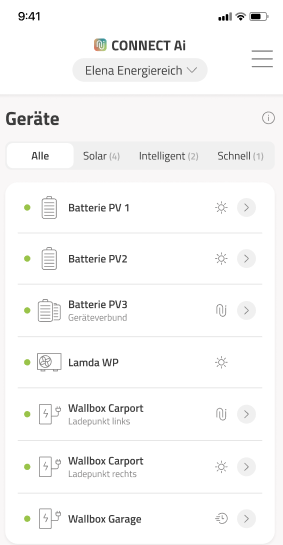
From app version V2.7 (release date 17.07.2025), a new device list was introduced. It can be reached via the neoom CONNECT main menu (Live overview top right

) as well as via the “Surplus prioritization” button. In addition to a list of all devices available at the site, there is a grouping of all devices by the optimization strategies SOLAR, INTELLIGENT and FAST.

In the SOLAR group, you can now set the surplus prioritization of the devices operated with PV surplus.

In the INTELLIGENT group, in addition to all devices currently operated with the “Intelligent” optimization strategy, any errors that prevent CONNECT Ai from taking over intelligent device control are also displayed. There is also a link to a corresponding knowledge base article. This helps both users and neoom Power Partners with faster error diagnosis:

😜No more Tesla in the garage [16.07.2025]
From app version V2.7 (release date 17.07.2025), there is no longer a Tesla in the garage in the CONNECT Ai live overview of the neoom app 😉 In addition, based on user feedback, the whole picture was made a bit smaller to leave more room for the content below.

🖥️New website: Devices supported by neoom CONNECT [28.05.2025]
At https://neoom.com/neoom-connect-geraete you will now find a completely redesigned page with detailed info on which devices can be controlled or read by neoom CONNECT.
In addition to clearer structuring by device manufacturer, device series and device model as well as better filter and navigation options, the redesigned page provides detailed information on which neoom CONNECT features (for example: CONNECT Ai, surplus charging) work with a particular device and via which protocol you need to connect the device for this (OCPP, Modbus TCP, HTTP, etc.). In addition, all data points that neoom CONNECT can read from or write to the device are listed for each device.
In the coming weeks, we will also add device-specific instructions for integration into neoom CONNECT. There will also be another piece of news that makes integration easier for you. Let yourself be surprised 😀
💶CONNECT Ai was trained on “truly negative” dynamic electricity prices [16.05.2025]
On Sunday, 11.05.2025, there were strongly negative electricity prices on the EPEX Spot Day Ahead exchange during the midday hours. The prices were so negative that, even when taking into account grid fees, levies and supplier surcharges, the electricity price for end customers with a dynamic EPEX Spot-based tariff was negative. The last time this happened was on 02.07.2023!
A truly negative electricity price results for end customers, due to grid fees, levies and surcharges, from a negative energy price of approx. 19 cents / kWh in Germany and from an energy price of 13 cents / kWh in Austria.
Since we will probably see truly negative electricity prices for end customers more often this summer, we have adapted CONNECT Ai accordingly.
With software release V 1.3.1, CONNECT Ai will prepare neoom CONNECT sites for truly negative electricity prices by discharging the battery as far as possible in the hours before the truly negative prices and feeding the PV surplus electricity into the grid as far as possible. This allows as much energy as possible to be drawn from the grid during the truly negative electricity price hours to charge the battery and cover self-consumption.
📩ADVANCE NOTICE: PUSH NOTIFICATIONS [15.05.2025]
In a few days, there will be an update of the neoom app (V2.6.0) through which our customers can receive push notifications directly on their smartphone.
Why we are providing this function: In certain situations, it is crucial that customers are informed immediately and reliably – e.g. in the case of:
- New features in the app: Customers learn directly what new options there are to save even more or earn more with the neoom storage power plant.
- Storms and flooding: Advice on how the neoom battery can be protected.
- Thunderstorms: Recommendations for increasing your battery emergency power reserve to be prepared for a possible power outage.
What are push notifications? Push notifications are short messages that appear directly on your smartphone screen – similar to an SMS or a WhatsApp notification. You receive these messages even when you have not opened the neoom app. This way, you no longer miss important information.
A push notification on a smartphone can look like this, for example:

What you should know as a neoom Power Partner if you get questions from customers about this: After app version 2.6.0 has been installed on the smartphone and the customer opens this app version for the first time, they will be asked whether they want to allow notifications. This should be confirmed with “Allow”.
If the user declined the prompt by mistake, the permission can easily be enabled in your smartphone's settings:
- Open your smartphone's settings
- On Android, select “Apps”, and on iOS (Apple), select “Notifications”
- Scroll to “neoom” and tap it
- On Android, select “Notifications”
On iOS and Android, enable the option so you can receive messages
Note: In the first version of the published push function, messages can only be sent by neoom. In the medium term, however, we plan an extension so that neoom Power Partners can also send messages to their customers.
🔩INSTALLER UPDATES [30.04.2025]
The following improvements have been added to the INSTALLER skill:
Faster upload of documentation photos with a poor internet connection / increased stability: Since installation is often carried out in areas of buildings with poor internet coverage, there were long waiting times until the photos taken with the INSTALLER during the installation process were uploaded to the neoom CONNECT cloud. From now on, the photos are compressed before uploading, so uploading is much faster, waiting time is reduced to a minimum and the stability of the INSTALLER skill is increased.
Option to assign CONNECT Mega license codes manually: We learned that for some of our Power Partners it is necessary in the contract process with the customer to assign very specific CONNECT Mega license codes. Until now, the INSTALLER assigned any one of your available license codes to the site. From now on, you can alternatively enter manually the license code you want to assign to the site / customer, instead of automatic assignment.
Automatic assignment (as already possible before):

Newly added option of manual assignment:

Option to assign the customer category to the site being newly created: Until now, it was not possible to assign the customer category to a newly created site via the INSTALLER skill. (This was previously only possible if the site was created without the INSTALLER.) We learned that assigning this category is often necessary for your internal processes, which is why we have added this option:

🔩BEAAM DETAIL PAGE ON CONNECT.NEOOM.COM [17.03.2025]
As a measure to make configuring and maintaining customer systems easier for you, there is now a BEAAM status indicator at connect.neoom.com. This status indicator is permanently displayed on the website for a site in the bottom left corner. Clicking the status indicator takes you to a page that shows the following:
- Detailed information about the BEAAM
- Status of the network connections
- Current software version
In addition, via the page you can:
- Reach the local user interface of the BEAAM (provided you are in the same LAN to which the BEAAM is connected). You can find info about the local user interface of the BEAAM here: Guide to BEAAM commissioning & troubleshooting BEAAM problems
- View the SW change history of the BEAAM software (BEAAM changelog)
- Trigger a software update and change the release channel (should only be set to a value other than “Stable” in consultation with neoom)
- Replace a defective BEAAM with another one

🔩CONNECT Ai functions now also available for cascaded (MAIN / SUPPORT) systems [06.03.2025]
At the beginning of April, we will release a software update that makes the function “Price-optimized charging of the battery with GRIID & CONNECT Ai” (see Price-optimized, intelligent charging of the battery with neoom Ai) work for MAIN / SUPPORT systems (also called “cascaded systems”) as well. In addition, the update will also enable the function “Automatic battery calibration” (see ) for MAIN / SUPPORT systems.
We have found that the majority of all MAIN / SUPPORT systems in neoom CONNECT are not configured as such. This is because this configuration option was only added a few months ago. Although this has no effect on the function of such a system (assuming correct wiring), it means that even after the planned software update, the two functions will not be available for such systems.
On the day of the software release, we will inform all customers with MAIN / SUPPORT systems that the two functions are now also available to them. Customers whose system is not yet configured as such in neoom CONNECT will also receive instructions on how to make the configuration. These instructions are relatively simple, but we will point out to customers that they should contact their Power Partner if they have problems. That is why you should also know how the change can be made.
This is what the MAIN / SUPPORT system currently looks like for many customers:

This is what the configuration of a MAIN / SUPPORT system should look like for the new functions to be available:

How you can change the configuration:
connect.neoom.com - Devices - Configure site - Select the Main battery system. In the Main battery system, set the field “Main Support configuration” to MAIN.
Then go to the Support battery system, set the field “Main Support configuration” to SUPPORT there and select the Main device from the drop-down menu below it. That's it. If there are several Support systems, repeat this step for all other systems.
If this was done correctly, the battery systems should be displayed hierarchically in the device overview on connect.neoom.com (as in the picture above - red circle).
🔩Removal of the “cell temperature” in CONNECT for all home storage systems [20.02.2025]
For all neoom home storage systems (with NEEO, Sofar, Solax & GoodWe), the cell temperature will no longer be displayed in the future at connect.neoom.com -> Devices -> “Selection of the storage system” -> “Status” tab.
The reason is that the corresponding register only showed the average temperature of the cells, which often led to confusion and provides no directly relevant information. Displaying the temperature of the individual battery cells is currently not possible for technical reasons.
The change has already been implemented and takes effect either when the CONNECT configuration is saved/applied again, or automatically with the next general BEAAM update.
🔩Change in the energy management settings on connect.neoom.com [11.02.2025]
From 12.02.2025, the switch “Surplus optimization enabled” under connect.neoom.com - Devices - Configure site - “Energy management” tab no longer exists.

This switch was previously active by default so that neoom CONNECT could carry out energy management at the site.
When the switch was enabled, the neoom storage system and controllable consumers (charging stations, heating elements, heat pumps) were controlled by CONNECT. For a storage system, this meant that the operating mode on the inverter was overridden by CONNECT.
If the switch was disabled, the operating modes could be set directly on the inverter, and the storage system was not controlled by neoom CONNECT.
The setting option has now been changed as follows:
To exempt a device (storage system with hybrid inverter or charging station) from neoom CONNECT energy management, you can now set the neoom CONNECT charging strategy to “Exempted” at connect.neoom.com - Devices - (selection of the device) - “Control” tab. If this is done for a neoom storage system, an inverter-specific operating mode can then be selected.

IMPORTANT: With the change on 12.02, for all sites where the switch “Surplus optimization enabled” was disabled, the CONNECT charging strategy is automatically set to “Exempted”, and the devices continue not to be controlled by CONNECT.
📱New app live view [27.01.2025]
The neoom CONNECT energy flow overview in the app has been completely redesigned. In addition to a fresh new design, the live view will offer customers more information and show the energy flow between PV, battery, consumers and grid in a better and more intuitive way. You can find more information here:
The update is part of app release V2.4.0 (see also:
👨🔧👩🔧INSTALLER: Improved photo upload and other optimizations [27.01.2025]
After we already published the first INSTALLER improvements a week ago, there are now further optimizations to make your installation work easier:
- Improvements & simplification in documenting the serial numbers.
- The step “Upload photos” was renamed to “Document serial numbers”
- The step “Set up BEAAM” was moved forward in the sequence, so that the BEAAM has enough time to do a SW update and go online while the rest of the system is being installed.
The update is part of app release V2.4.0 (see also:
🔩Setting the inverter operating mode via neoom CONNECT [27.01.2025]
It is now possible in neoom CONNECT (connect.neoom.com) to set the inverter operating mode of the neoom storage system. Until now, this setting could only be made via the inverter's display.
What this is needed for:
Normally, neoom CONNECT or CONNECT Ai controls the inverter's operating mode in order to carry out energy optimizations at the site. In special cases, the customer wants to prevent automatic control by neoom CONNECT in order to use the inverter's special operating modes. This can now be achieved by setting the neoom CONNECT charging strategy to “exempted”, as shown in the screenshot, and selecting the desired inverter operating mode below it.

Please note that in this case neoom CONNECT no longer performs any energy optimizations at the site via the neoom storage system. In addition, the customer can no longer select the battery charging strategies “Solar” and “Intelligent” in the app.
🔩Setting the inverter feed-in limit via the neoom CONNECT web interface [20.01.2025]
It is now possible to set a feed-in limit on the inverter via the neoom CONNECT web interface (connect.neoom.com). This saves you a time-consuming trip to the customer site. The option is available for all NEEO, SOFAR and SOLAX inverters that are part of the neoom KJUUBE/STAAK storage system.
Here is how to apply the feed-in limit in neoom CONNECT:
https://connect.neoom.com🡪 Devices 🡪 Configure site 🡪 Select the “Inverter/storage system (STAAK, KJUUBE)” and click “Change” 🡪 Under “Restriction at grid connection” you will find the value “Max. feed-in power”. Please enter the feed-in limit value specified by the grid operator here.
After you have entered the value here, be sure to click the “Apply configuration” button on the site configuration overview page. Only this ensures that the value entered earlier is sent to the inverter.
ATTENTION: The value for setting the “Max. feed-in power” can already be set at connect.neoom.com now, but please note that the procedure described above for writing the value to the inverter only works from 20.01.
IMPORTANT: As different values for the feed-in limit may have been entered in the past at connect.neoom.com than directly on the inverter's display, we will synchronize the two values on 17 February 2025 by automatically adopting, for all sites, the values entered on the inverter into neoom CONNECT on that day. The synchronization in this direction (inverter to neoom CONNECT) was chosen because the value entered on the inverter is the one according to which the feed-in is actually limited.
🔩Setting the correct battery currents for the storage [20.01.2025]
When installing a neoom storage system, the correct battery charge and discharge currents must be set on the inverter display. Unfortunately, we have found that these values are often set incorrectly, which is why we have introduced the option to change these values afterwards in neoom CONNECT as well, without you having to drive to the customer. Here is how to make the change: https://connect.neoom.com 🡪 Devices 🡪 Select the “Inverter/storage system (STAAK, KJUUBE) 🡪 “Control” tab 🡪 At the very bottom you will find the section for setting the battery currents.
You can find the correct values here:
👨🔧👩🔧INSTALLER: Optional step “Measure and document” [15.01.2025]
We received feedback from some of you that you would like to skip the INSTALLER step “Measure and document” because you have your own process for it and a mandatory step in the INSTALLER creates extra work for you. We have therefore published an updated version of the INSTALLER where you can skip this step if you have your own documentation process for it.
🎄NEOOM APP CHRISTMAS UPDATE🎄 Intelligent car charging with CONNECT Ai and GRIID [18.12.2024]
From app version 2.3.0, all neoom users of a home storage system have the option to select the charging strategy “INTELLIGENT” in the app on the charging station detail page (see update entry of 11.12.2024 - further below).
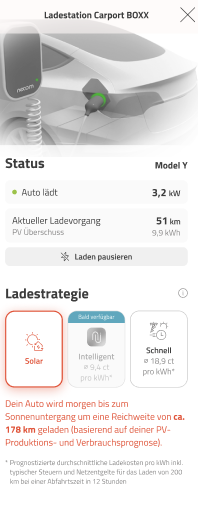
With this, users of a dynamic electricity tariff (GRIID) can use CONNECT Ai to charge their car by the desired departure time as cheaply as possible and as fast as necessary. CONNECT Ai controls the charging process so that electricity comes from the PV system, from the storage and, if necessary, from the grid during the cheapest possible hours, without the user having to take care of controlling the charging process. You can find details on the function in the following article: Price-optimized, intelligent car charging with neoom Ai
Note: If you also want to learn more about the function “Intelligent charging of the battery at dynamic electricity prices”, which has been available for longer, you can do so in the following article: Price-optimized, intelligent charging of the battery with neoom Ai
Update battery and charging station detail pages [11.12.2024]
With the new release to app version 2.2.1, there is now a separate detail page for both the electricity storage and the charging station. From the dashboard, users reach the corresponding detail pages with one click.

On the detail page for the storage, the user gets an overview of the current status, such as “Battery fully charged” or “Battery charging”, as well as the selection of charging strategies. If the user has activated the GRIID skill, they can choose between “Solar” or “Intelligent” to charge their storage.

On the detail page for the charging station, the user also gets an overview of the current status of their electric vehicle – whether it is charging, not charging, etc. – as well as information on the current charging process, such as how many km have already been charged into the electric vehicle. In addition, the user can also pause or resume the current charging process.
The user also selects their charging strategy here. Until now, it was possible to choose between “Solar” and “Fast”; new from mid-December, we are also enabling the GRIID skill here and thus the “Intelligent” strategy for the charging station as well.

Integration of KATHREIN charging stations [09.12.2024]
As requested by some of our Power Partners, KATHREIN charging stations with the designation KWB-AC can now be integrated into neoom CONNECT. The charging station can be connected via MODBUS TCP and OCPP. With a connection via MODBUS, the following use cases are supported:
- Visualization in the neoom app and in the CONNECT web interface
- Surplus charging (including consideration in the neoom device prioritization)
- Fast charging
- Intelligent charging with neoom CONNECT Ai and GRIID (available from early January)
- Phase switching (available from early January)
With a connection via OCPP, the following use cases are supported:
- Visualization in the neoom app and in the CONNECT web interface
- Manage RFID access control via neoom CONNECT
Improvements to the battery display in the neoom CONNECT web interface [29.11.2024]
The battery display in the neoom CONNECT web interface (found under: Devices --> {selection of the battery system} --> “Control” tab) has been improved as follows:
The capacity reserves for deep discharge protection and for the inverter self-consumption reserve are now displayed. This makes it clearer for the customer how much emergency power reserve is actually available.

What “Protection against deep discharge” means: Deep discharge means the almost complete depletion of the battery capacity. This can be harmful to the battery. That is why, from a remaining capacity of 5%, no more energy is drawn from the battery, to protect it from deep discharge.
What “System reserve” means: The inverter also needs energy for correct operation. So that the inverter's control of the battery still works flawlessly even at very low charge levels, the system keeps a small amount of energy available exclusively for self-consumption (system reserve). This amount of energy is determined by the system and cannot be changed by the user.
Integration of the mobile charging solution from NRGkick into neoom CONNECT [26.11.2024]
The mobile charging solution from NRGkick, which is especially popular with our customers, has been integrated into neoom CONNECT. The integration was only possible now because NRGkick recently provided the corresponding interface. This means CONNECT can now carry out all charging modes (PV surplus, fast charging and, from December, also INTELLIGENT charging with CONNECT Ai and GRIID) with the NRGkick charging cable as well. Important: Please make sure that the “Local JSON API” setting is enabled in the NRGkick app so that the integration works correctly! Please set authentication to NONE in neoom CONNECT. You can find detailed instructions for the integration here:
Extensions to the neoom CONNECT data export [06.11.2024]
Via the web interface connect.neoom.com, in the menu item “Data export”, neoom CONNECT offers the option to export recorded data of a site to an Excel file. Meter readings, car charging sessions and various device data can be exported. The following extensions are now available:
- The export of charging sessions was previously limited to 32 days and has now been increased to 400 days.
- The export of meter data in 1-day intervals was previously limited to 32 days and has now been increased to 400 days.
- Previously, 10 devices or charging points could be exported at once. This value has been increased to 100.
- In addition, the data export has been sped up
Forcing your customers' battery charging [09.10.2024]
If you want to force your customers' battery charging due to a storage upgrade or for other reasons, this is possible via connect.neoom.com, menu item “Devices”, and after selecting the storage in the device list, under the “Control” tab. Simply set the emergency power reserve to the maximum value there. IMPORTANT: If you do this, the battery is charged not only with PV electricity but with electricity from the grid, so that charging happens as quickly as possible. For storage systems with NEEO and SOFAR inverters, charging from the grid already works when the emergency power reserve is raised. If this does not yet happen with storage systems with SOLAX inverters, please proceed as follows: Go to “Configure site” in the device list and then click “Apply configuration”. After about 2 minutes, charging from the grid then also works for a Solax system.
Note: If the battery does not charge after the emergency power reserve has been increased, please check directly on the inverter whether EPS mode is active there and activate it if it is deactivated.
Change to the PV grouping function in the neoom web interface (connect.neoom.com) [18.09.2024]
With the migration of neoom CONNECT sites to the new data model, there is also a change to the PV grouping function. See the following article: This function mainly affects sites of our business customers with a neoom BLOOK storage, as these often have several PV systems. Our customers and the Power Partners who are affected will be informed separately by e-mail.
Update neoom app - new surplus prioritization & detail page for charging station [02.09.2024]
In the redesigned “Surplus prioritization”, found in the menu under the Surplus prioritization tab, the user gets an overview of the devices that are currently being charged with solar surplus. Devices that are not charged with solar surplus are not shown in the surplus prioritization. The order of the devices can, as before, be moved to any desired position without limit by simple drag and drop or using the icon on the right-hand side.
In addition, there is now also a detail page for the charging station, on which the user can currently select the two charging strategies “Solar” and “Fast”. The user finds it via the live view by clicking the arrow next to “Charging stations”.
As part of this app update, the technical platform of the app was also switched to a new system. For end users, this results in no functional changes, but it has improved operation in many details and the app responds faster. Operation is therefore even more convenient.
IDM, Lambda and M-TEC heat pumps can now also be integrated into CONNECT via Modbus power setpoint [19.08.2024]
The heat pumps from IDM, Lamda and M-TEC listed on our devices page https://neoom.com/neoom-connect-geraete can now also be integrated into neoom CONNECT via Modbus power setpoint.
This has the advantage that solar surplus operation of the heat pump is even more efficient: Compared to an SG-Ready-based connection, neoom CONNECT can send the currently available solar surplus power to the heat pump. The heat pump can then regulate its power level accordingly.
Create multiple charging points of a charging station in CONNECT [07.08.2024]
For charging station owners, we have made further improvements to neoom CONNECT. You can now configure multiple charging stations in a so-called Main/Support group or a charging station with multiple charging points, instead of creating a separate device for each charging point, as was previously the case with OCPP integration.
GRIID can now also be activated with dynamic feed-in tariffs [05.07.2024]
From app version 1.96, GRIID can also be activated with a dynamic feed-in tariff (EPEX Spot). This was previously a technical limitation that has now been lifted.
Attention: This does not mean that GRIID also feeds in in a price-optimized way, but that the technical limitation no longer applies. Simulations have shown that the GRIID algorithm already makes profits in its current form, although it is not yet perfect for this case. The algorithm is continuously improved and will keep offering optimizations and new possibilities in the future.
New data model in neoom CONNECT [03.07.2024]
We are currently in the process of changing our internal data model, that is, the way we manage energy devices in our software. This change mainly serves internal purposes so that we can better represent future extensions. Nevertheless, it results in some small changes in the neoom CONNECT web interface, which we would like to inform you about here:
You will notice the following changes gradually at your customers' sites over the next few weeks.
- The BEAAM is no longer shown in the product overview (formerly device overview), as the only information previously shown there, the BEAAM online status, can also be seen when you hover the mouse over the status dot in the site icon at the top left.
- A PV system is also no longer shown in the product list as its own “device”, but you will find all the data previously shown there under the “Battery product”, which you can find in the device list (now product list).
- Until now, it was possible to group devices (now products) into their own categories. Since our customers did not use this function but it led to complexity in the software, it was removed.
Here is how you can tell whether the site has already been switched to the new data model:
- Open the customer UI view of the site at https://connect.neoom.com
- Select “Devices” in the side menu on the left
- Now check your browser's address bar. If the last word there is “products”, the site is already in the new data model. If the word “things” appears there, the site is still in the old data model
Improvement of phase switching for EV charging stations [02.07.2024]
With automatic phase switching, it was already possible with the Compleo Solo N+ to make optimal use of the surplus from the PV system and thus maximize self-consumption. Depending on how much surplus is available, it switches between single-phase and three-phase charging. With the latest improvements, the surplus energy can now be used even more efficiently via CONNECT for charging the EV, unnecessary phase switching is avoided and a more stable charging process is guaranteed.
Tariff selection for GRIID [30.06.2024]
From app version 1.95, a drop-down is available to users for easier selection of the correct tariff when choosing the electricity tariff, for both the dynamic purchase tariff and the dynamic feed-in tariff.
If users cannot find their electricity tariff in the list, it can be added by neoom. A short message to our support team is enough for this.
LIST OF ALL IMPORTANT NOTICES PUBLISHED SO FAR
Electrical energy consumption of some heating elements/heat pumps is displayed incorrectly [02.12.2025]
Customers with an iDM or KNV/NIBE heat pump or a myPV or Askoheat heating element are currently shown incorrect energy values in the neoom app and at connect.neoom.com. We are already working on a fix and will provide a solution in a few days. The problem is fixed as of BEAAM version v1.74.2-build7507.
BEAAM EXTENSION NOT ONLINE [11.08.2025]
Some BEAAM Extensions do not get an IP address when the Extension is restarted if the BEAAM is not available at the time of the restart. You can recognize this by the gray status symbol under connect.neoom.com --> Devices --> Extensions:

This affects the SG-Ready function for controlling the heat pump as well as the curtailment of the PV generator power upon a grid operator signal.
Remedy: Make sure the BEAAM is online and then restart the BEAAM Extension.
PROBLEMS WITH THE “GRID FEED-IN PRIORITIZATION” FEATURE [11.08.2025] The problem with prioritized grid feed-in was fixed with BEAAM version 1.72.0. The version will be rolled out automatically to all sites in the next few days. An update can also be triggered immediately at connect.neoom.com. (Click the BEAAM tile at the bottom left and then click “Perform update” under Software.)
PROBLEM WITH GO-E FIRMWARE VERSION 56.9 to 59.3 If there are problems with neoom CONNECT controlling a Go-e charging station, please make sure that firmware 59.4 or higher is installed on the charging station.
Impact with Go-e firmware 56.9 to 59.3 installed: Charging strategies such as “Intelligent”, “Fast”, “Solar” as well as setting or stopping the charging current in the “Exempted” mode no longer work correctly. Example: If neoom CONNECT limits the current to 10 A for solar charging, the station still continues charging at 16 A.
PROBLEM WITH SG-READY HEAT PUMPS Currently, heat pumps connected to neoom CONNECT Ai via SG-Ready do not receive a start recommendation when enough PV surplus is available.
The problem will be fixed with BEAAM software 1.71. This will be rolled out in the next few days. If an immediate fix is needed, neoom support can install the pre-release version of V1.71 on request.
INCORRECT POWER DISPLAY FOR HOUSE CONSUMPTION FOR SOLAX-BASED MAIN/SUPPORT SYSTEMS
Currently, house consumption (power) is not displayed or not displayed correctly for Solax-based Main / Support systems (cascaded systems).
The problem will be fixed with BEAAM software 1.71. This will be rolled out in the next few days. If an immediate fix is needed, neoom support can install the pre-release version of V1.71 on request.
CHOOSING THE RIGHT BEAAM SOFTWARE RELEASE CHANNEL
We often get requests from you saying that your customers do not want automatic software updates of the BEAAM software. In this case, please set the release channel to “Restricted” on the BEAAM detail page (reachable via connect.neoom.com --> BEAAM status icon at the bottom left).

STORAGE IS NOT FULLY CHARGED BY CONNECT Ai/GRIID
We have received customer inquiries asking why GRIID / CONNECT Ai regularly charges the storage only partially, even though consumption would justify a fully charged storage. In most cases, such behavior is due to an incorrect configuration of the storage system. For example, if the maximum battery charging power is set too high in neoom CONNECT, but in reality the battery can only be charged at a lower power, this behavior can occur. Please therefore check the correct settings for the maximum battery power, the maximum inverter power and the battery capacity in neoom CONNECT if you receive such inquiries from your customers.
CUSTOMER'S BATTERY SYSTEM SUDDENLY CHARGES AT NIGHT
Since we keep getting questions from you about why customers' battery systems are suddenly charged at night, we would like to draw your attention to the so-called “Battery balancing” function that protects the battery systems. You can find the details at
BATTERY CALIBRATION “BATTERY BALANCING” CANNOT BE DISABLED We keep receiving requests from customers to disable the function for their site. This is not possible, as it is a regularly necessary maintenance function that serves to protect the battery and extend its lifespan. You can find more information on battery calibration here: